 Guitar Master
 › Guitar exercises
Guitar exercises built on your song
Instead of generic exercises you give up on after a week, Guitar Master starts from the chords of the song you want to play. Scales, arpeggios, chord changes, right hand, fingerpicking, speed: the app writes the exercise on that song, plays it, and shows it on the fretboard and in tab.
The principle is always the same: you write the chord chart once, in the Jam (or you pick a standard or a blues from Band Jam), and every trainer uses it. Never the same exercise twice, always on music you actually want to play.
Play bass? The same idea works for bass: a step-by-step curriculum, lines in sixteen styles and a band that plays along with you →
The trainers
Generate your own exercises, with every setting adjustable
Guitar Master’s trainers are exercise generators: you choose the song, you adjust the settings, and they write the exercise, play it, show it on the fretboard or the keyboard and write it out in tab or notation. Each one starts from ready-made presets, and every setting can be changed.
- Scale Trainer: the scale or arpeggio over each chord, the position on the neck, the level, the tempo
- Chord Trainer: triads, four-note chords, open chords, barre chords, jazz voicings, cadences, strummed as block chords, arpeggiated or picked
- Fingerstyle Trainer: the right-hand pattern, finger by finger, over your chords
- Bass Trainer: the style and substyle, the role, the approach, the feel, the vocabulary, the fingering, plus sliders for density, complexity and chromaticism
- Piano Trainer: eighteen styles and their substyles, both hands written separately, six sliders
- An exercise you like can be saved and found again in your catalog, and a teacher can send it to a student
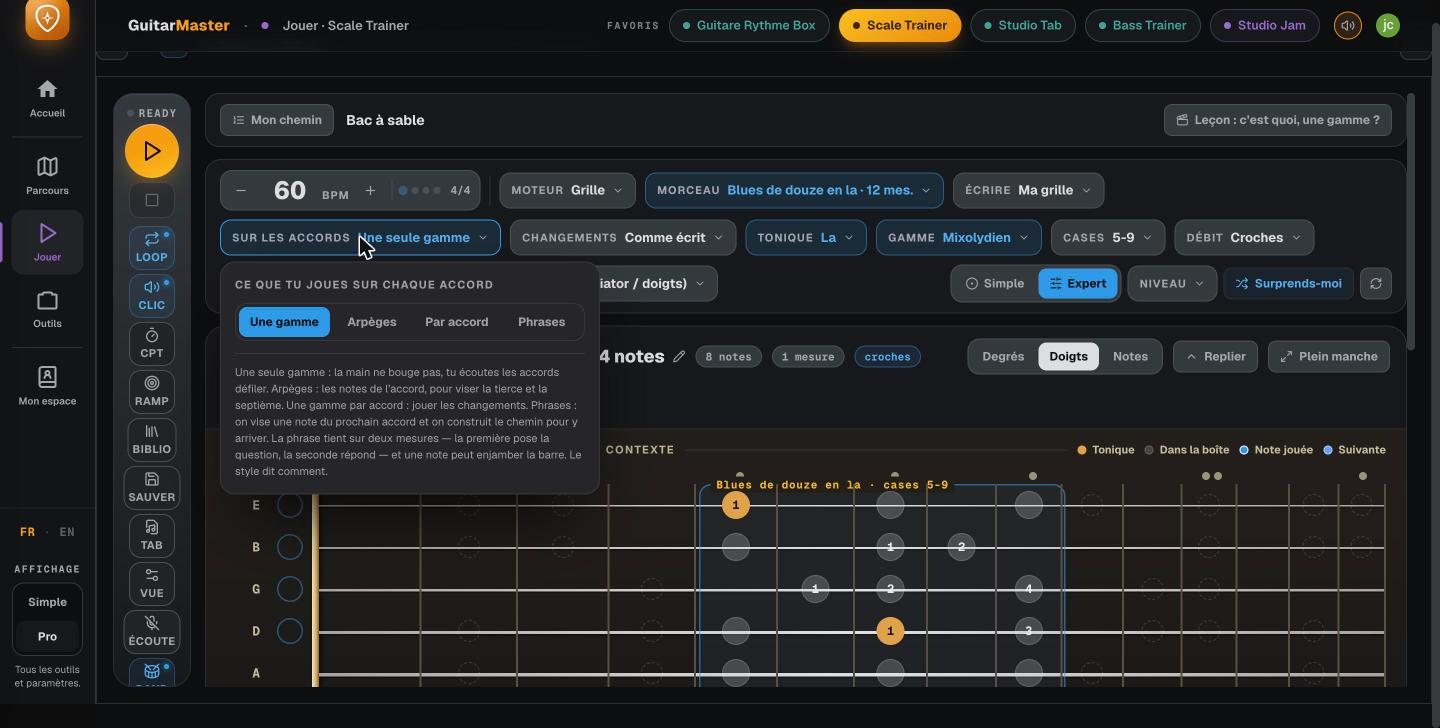
Scale Trainer
Scales and arpeggios, over each chord
The scale that fits each chord, the arpeggio of the chord itself, or one scale for the whole song from start to finish. The exercise is built for you, plays at a tempo you raise little by little, appears on the fretboard and is written out in tab. Four ready-made levels let you start without setting anything up.
Chord Trainer
Changing chords without hesitating
When you change chords, the real issue is choosing the voicing that flows well from the previous one. The app takes care of that and shows you the way, chord after chord: triads, open chords, barre chords, jazz chords, the ii-V-I cadence, arpeggios. As block chords, arpeggiated, picked, or over a strumming pattern you write. And the chord coach checks your transitions through the mic.
Rhythm Box
The right hand, the one nobody practices
You write your strumming pattern stroke by stroke, with a pick (accent, down, up, muted, rest) or with your fingers, you hear it over the chords of your song, and you loop it until it holds together. The strings that ring light up, and subdivisions go all the way to sextuplets. Nineteen drum grooves and twenty-three right-hand patterns come included to get you started.

Fingerstyle Trainer
Fingerpicking, step by step
More than ninety lessons across nine levels, with three style branches: bossa, percussive and blues. And “My study piece”: drop in the Guitar Pro tab of a fingerstyle piece, and the app analyzes it and turns it into a study path, section by section, with the tab looping at the tempo you choose.
Speed
Speed, with a rising tempo
Every exercise is practiced in steps: you start at a tempo where it’s clean and go up little by little. Speed Picking and Scale Runner use the mic to check what you’re really playing, so you gain speed without sacrificing accuracy.
Sessions
Your practice sessions, ready to play
String your exercises together into a routine: the session runs through the steps one after another, and all you have to do is play. The curriculum also suggests today’s session, and your teacher can leave you an exercise after the lesson.

These features are part of Guitar Master’s full access (€14.90 a month, no commitment, opening soon; included for students taking lessons). The core tools stay free for everyone.
Read next
Frequently asked questions
How do you practice scales over a song?
Write the song’s chord chart in the Jam, then open the Scale Trainer: it shows the scale or arpeggio that fits each chord, on the fretboard and in tab, and plays it with the backing at the tempo you choose.
How do you change chords faster?
By choosing voicings that are close to each other and practicing the change slowly, with a metronome. The Chord Trainer picks the voicings that connect best on your chord chart, and the chord coach checks your transitions through the mic.
Can you create your own exercises?
Yes: that’s what the trainers are for. You choose the song and set up the exercise (scale, arpeggio, chord type, voicings, right-hand pattern, bass or piano style, tempo), and the app writes it, plays it and generates the tab.
Are the exercises always the same?
No: they’re generated from your chord chart and your settings. Change the song, and the exercise changes with it.
Can you start from an existing tab?
Yes for fingerpicking: a Guitar Pro tab becomes a study path in the Fingerstyle Trainer. Guitar Pro and MusicXML files also open in the tab player.