
Finally, a tool built
to help you improve.
Designed for the guitarist practicing alone at home: Guitar Master tells you what to work on, generates your exercises, and plays along behind you.
Discover Guitar Master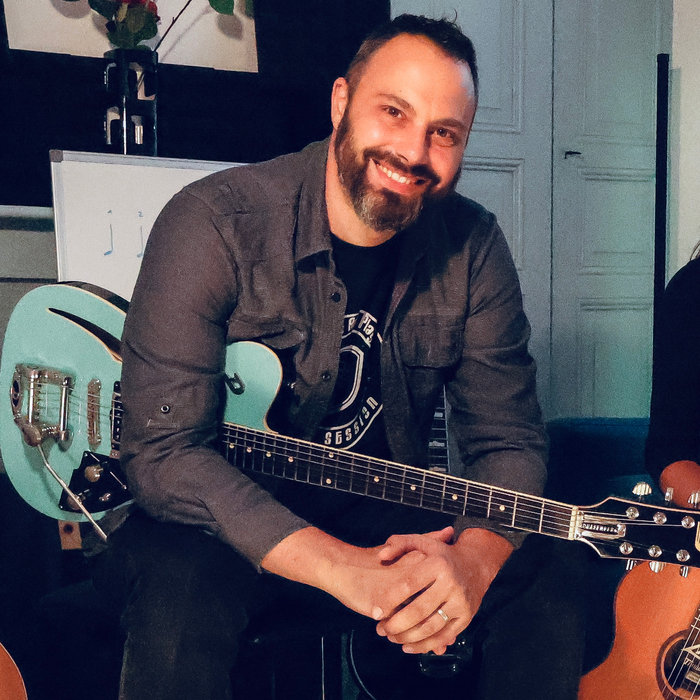 Guitar Master · published by Samaria Studio, designed with Jean-Christophe Vignon, guitar teacher
Every tool
a guitarist needs.
One app.
Write the chord chart of your song, and the app shows you what to play over it: the scale, the arpeggio, the bass line, the piano accompaniment. Twenty-nine tools, four trainers and a 198-step curriculum, built by Samaria Studio with a guitar teacher, for his own students first.
A core set of tools stays free for everyone, no subscription needed.


What's inside.
You are…
The same app, two completely different uses. Pick yours, and the page takes you straight to the right section.
A guitarist practicing on your own
You don't take lessons, or not anymore. You're looking for a way to practice seriously: a band behind you, a fretboard that finally makes sense, rhythm you can see, a curriculum that holds together.
What's in the app →A guitar teacher
You teach, and you're looking for what I was looking for: a real tool to leave with your students between lessons. A space of your own, your locker, up to 35 students.
The teacher plan →You practice on your own
The problem was never a lack of videos. It's knowing what to practice, how to practice it, and hearing whether you're playing it right. Here is what the app gives you, in pictures, with real screenshots. Tap a screenshot to enlarge it.
Write it. Play it. Print it.
Enter the chords of your song, section by section. Guitar Master plays it right away (drums, bass and piano behind you) so you can practice at the right speed. And when it's ready, you print it as a PDF: a clean sheet for the music stand, to play without a screen, or to hand to a student.

In the app: you write the chart in sections, and it plays: drums, bass, piano. Drag the sections to change the order, and raise the tempo when you're ready.

The same song, printed: key, tempo, arrangement and chart on one clean sheet. To play without a screen, put on the music stand, or give to a student.
Write your chord chart.
The app shows you what to play over it.
Four generators, one idea: you enter the chords of your song, and the app builds what to play over them: the scale, the arpeggio, the bass line, the piano accompaniment. It plays it, shows it on the neck and writes it in tab. Your teacher can send you one after a lesson.
Scale Trainer
Scales & arpeggiosWrite your chart, and the app shows you what to play over it: the scale that fits each chord, the chord's own arpeggio, or the song's scale from start to finish. The exercise is built for you and never the same twice: it plays at a tempo you raise little by little, shows up on the neck and is written in tab. Four ready-made levels let you get started without setting anything up.

Chord Trainer
ChordsThe real challenge when you change chords is choosing the voicing that follows smoothly from the previous one. The app takes care of it and shows you the way, chord after chord. Strummed, arpeggiated, fingerpicked or over a rhythm you write yourself. Five ready-made starting points: open chords, barre chords, triads, ii-V-I cadence, jazz.

Bass Trainer
BassPop, rock, blues, jazz, funk, soul, reggae, gospel, bossa, country, disco, neo-soul, metal, ballad… and thirty-seven sub-styles behind them. You write the chart, and the app writes a real bass line over it, with the ghost notes and the placement that make the style. Listen to it and play along, or work on it yourself in tab.

Piano Trainer
PianoPop, ballad, rock, country, classical, jazz, bossa nova, soul, R&B, gospel, blues, funk, reggae, disco, Latin… The left hand and the right hand are written separately, with the melody, the countermelody and the pedal, and shown on two staves like real sheet music. It also works as accompaniment in Studio Jam, and lets you hear the harmony differently than on guitar.

Plug in your guitar.
Eleven amps are waiting.
Not a rough simulation: real captured amps, modeled by a neural network, running in your browser. Plug in your cable, pick an amp, play. Nothing to install, nothing to buy.


Eleven captured amps
ToneEach amp is a sonic snapshot of a real machine: sound was run through it, and a small neural network learned to respond exactly the same way. Ten guitar amps, one bass amp, six cabinets and six reverbs recorded in real places. You can even import your own captures: they stay on your device.
Twenty-seven pedals
PedalboardCompressor, auto-wah, overdrive, distortion, fuzz, chorus, phaser, tremolo, flanger, delay, spring reverb… fifteen pedals are captures too, of real stompboxes. The chain follows the order of a real pedalboard, and fifteen ready-made presets save you from building everything yourself.
Record yourself
MultitrackThe studio records while the backing plays your chart. Five tracks, your sound card's latency corrected automatically, trimming of your best takes, and export of the finished song as WAV or MP3. Enough to keep an idea before it slips away.
The song writes itself
AnalysisDrop in a recording: the app looks for its tempo, key, chords and sections, then writes the chart. It even searches thirteen thousand drum grooves for the one closest to what it just heard. Fix whatever you like, and play over it.
“A student who can't hear himself properly doesn't play the same way. I wanted people to be able to plug in their guitar and get a real tone right away, without buying software or figuring out how it works.” · JC
The studio requires a computer and, to plug in an electric guitar, a small audio interface. At home, it replaces software that costs several hundred euros.
The one nobody practices.
We spend years on the left hand, and the right hand is left to chance. The Rhythm Box gives it a workshop: you write your rhythm stroke by stroke, with a pick or with your fingers, hear it over your song's chords, and loop it until it holds.


“In sixteen years of teaching, this is what comes up most often: ‘I know my chords, but it doesn't sound right.’ Nine times out of ten, it's the right hand.” · JC
Nineteen drum grooves and twenty-three right-hand patterns come built in to get you started. Yours can be saved and renamed, and your teacher can send you one after a lesson.
Twenty-nine tools
in one place.
Usually, it's a tuner here, a metronome there, a chord website, a video tab and a tab program. Here, everything is in the same window, on the same song. Here are nine of them in pictures: real screenshots of the app, not illustrations. The full list is right below.

Precision tuner
Real-time microphone detection, accurate to a hundredth of a semitone, all six strings tracked one by one, alternate tunings included. Free for everyone.

Rhythm Box
The motion of the right hand, arrow by arrow, synced to the tempo: with a pick or with your fingers (thumb, index, middle, ring). You write your own rhythm stroke by stroke and keep it. Drums, metronome, swing, time signatures, 19 grooves and 23 ready-made right-hand patterns.

Studio Jam
Write your verse-chorus chart, set the tempo, and play over a real bass, drums and piano backing. Drag the arrangement around with the mouse.

Fretboard explorer
Scales, triads, seventh chords and chords shown across the whole neck, as notes or intervals, with sound. For guitar, bass, ukulele and piano.

Chord library
113 chords in easy-to-read diagrams, playable as block chords or arpeggios, with the chords harmonized in each key. Guitar, ukulele, banjo and piano.

Tab player and editor
Open your Guitar Pro (.gp) and MusicXML files, listen to them, follow the cursor, slow down, loop a passage, and write your own tabs. What usually takes separate software is here, in the same window, on the same song.
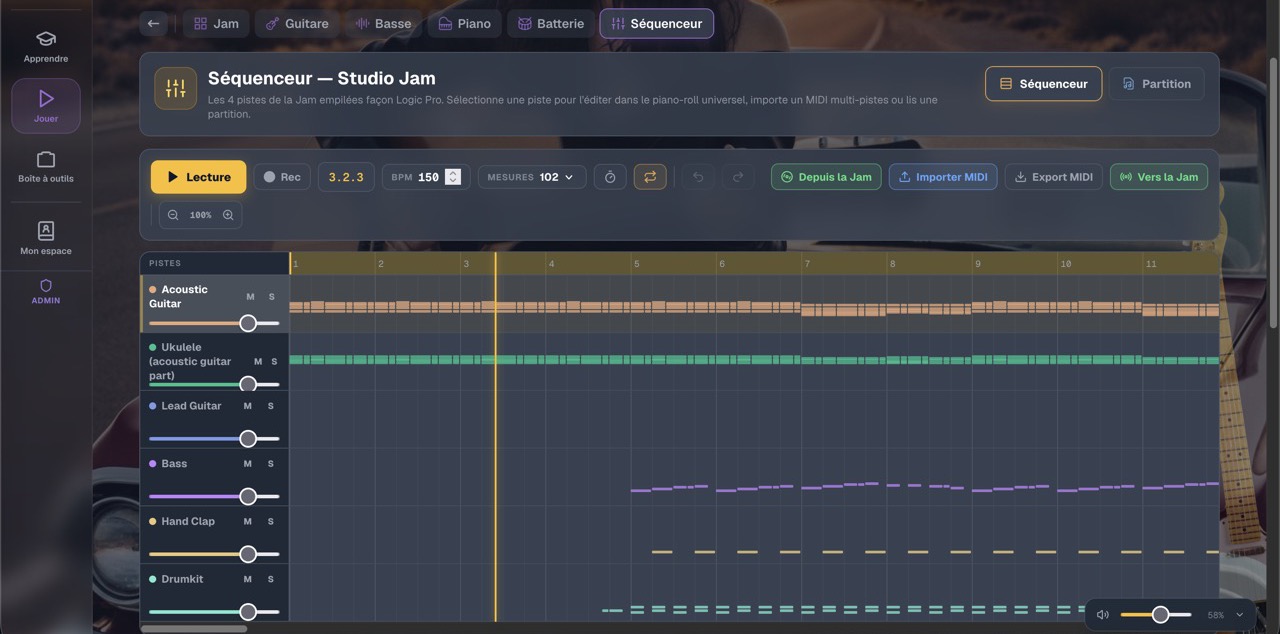
Drums and sequencer
Build your grooves step by step, or start from one of the existing patterns. Tempo, swing and dynamics can be fine-tuned down to the last detail.

Piano studio
The accompanying piano follows your chart and changes the way it plays with the style. Useful for hearing the harmony differently than on guitar.
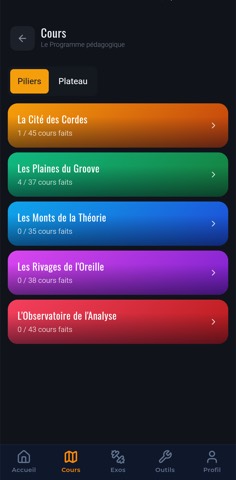
The guided curriculum
198 steps across five pillars, with in-depth lessons, exercises and progress tracking. Plus the exercises I post after each lesson.
Learn: we guide you
- Curriculum: 198 steps, five pillars
- Story mode: the same path, told as a story
- Theory: intervals, scales, chords, cadences
- Technique: left hand, right hand, accuracy
- Ear: 46 exercises, see below
- Rhythm: reading, composer, body rhythm
- Video lessons
- Chord coach: your chord changes checked through the microphone
Play: your song
- Studio Jam: your chart, and a band that follows you
- Guitar Studio: strumming patterns, arpeggios, fingerpicking
- Bass Studio: voices, lines and presets
- Piano Studio: chords, voicings, progressions
- Drum Studio: grooves, kits and drummers
- Sequencer: all four tracks in a piano roll
- Looper: record a loop, play over it
- Backing tracks: play over a backing
- Recording studio: record yourself over the chart
Toolbox: grab it, put it back
- Tuner: string by string, to the cent
- Metronome: the tempo, nothing else
- Rhythm Box: a rhythm part that plays along with you
- Virtual drum kit: the full kit, on your keyboard
- Chords: diagrams, inversions, arpeggios
- Scales and Fretboard: one neck for everything
- Scores: .gp and MusicXML files
- Tab editor: write a tab linked to the Jam
- Scale · Chord · Bass · Piano Trainer
- Sessions: chain your exercises into a routine
And a whole room for your ear
46 of the app's 80 exercises are devoted to it. It's the pillar guitarists practice least, and the one that makes the difference between playing notes and making music.
Hear
- Major or minor, with your eyes closed
- Six chord qualities on the same root: 7, m7, Maj7, m7♭5
- The basic intervals, and which one is wider
- Identify a scale, then complete it
- Recognize the mode: Ionian, Dorian, Mixolydian…
- Recognize the cadence
- Find the wrong note
Sing, into the microphone
- Sing the note you just heard
- Drone: sing each degree of the scale
- Vocal warm-up and holding a note
- Twelve guided vocal exercises: scales, thirds, fifths, octaves, major and minor arpeggios
- Sing the chords of the scale
- Your pitch is shown in real time while you sing
Play what you hear
- Play back the melody you just heard
- Melodic memory, longer and longer
- Find the note on the neck
- Octave Hunter: the same note, three positions
- Riff Match: reproduce a well-known riff
- Jam Coach: guess the key of what's playing
- Scale Runner and Speed Picking, checked through the microphone
Your set list, ready for the stage.
Put your songs in concert order, each with its chord chart. On stage, you move on with a single gesture (the current song shown large, the next one already announced), and the whole set list stays playable offline: no network, no nasty surprises.

The set list: your songs in order, saved and playable without a network. Here, 47 songs ready for the evening.

On stage: the chart shown large, your place in the set list, and the next song announced. One gesture, and you're on to the next.
“This isn't an app I ordered from someone. It's the one I use myself, every day, as a musician, right up to the stage.” · Jean-Christophe

Your guitar goes everywhere with you.
One account, and everything syncs: what you write on your computer (a chart, a set list, a tab) is on your phone a moment later, and the other way around. Your songs, your scores and the exercises posted by your teacher follow you from one device to another, with nothing to copy over. The pocket app carries the essential tools; the computer remains the complete workshop.
-
On a computer, in the browser
Nothing to install. It's the most comfortable version for the jam studio, writing charts and tabs.
-
The tools, offline No internet
Tuner, drum machine, scales, chords, fretboard: everything works on the train, at rehearsal or at the bottom of the garden.
-
Lessons, online Connection required
Your songs, your scores, your exercises and your teacher's locker travel from one device to another. Detailed progress tracking, however, lives on the computer.
-
Nothing heavy to install
On iPhone as on Android, you add the app from the browser, and from then on it behaves like a real app.


Real screens from the mobile app, and everything syncs with the computer version.
Five pillars, 198 steps.
The app isn't just a toolbox: it also contains the complete curriculum, built on sixteen years of teaching and written up in nearly one hundred thousand words (in French). Click a pillar to see what you work on there, step by step.
↑ Click a pillar to see the curriculum in detail
Instrumental practice
45 lessons · The guitar in your hands
Everything you play with your fingers: holding the instrument, chords, the right hand, melody, improvisation. It's the most visible pillar, and the one the other four build on.
Discovery
- Posture, holding the pick, minimal left-hand pressure
- The six open strings and tuning
- Reading tab (and why the rhythm isn't in it)
- Your first chords: Em, Am, then E, A, D
- First melodies on one or two strings
Progress
- The 7 open chords, timed changes
- Right hand with a pick: steady down-up motion
- Fingerpicking: alternating thumb, then Travis picking
- A first complete song, from start to finish
- Pentatonic, first position
Mastery
- Barre chords (F, Bm) and the CAGED system
- Palm muting, arpeggios, melody and bass together
- The 5 pentatonic positions across the whole neck
- First improvised phrases
- Three-voice fingerstyle, fast picking
In practice, in lessons: this is where I correct what no video can correct for you: the angle of your wrist, finger pressure, the movement that tires you out for nothing.
Rhythm work
37 lessons · Rhythm, starting in the body
The most neglected pillar, and by far the most decisive. Three well-placed chords sound better than twenty floating ones, and it's the first thing people listening to you will hear.
Discovery
- Feel the pulse, tap your foot, count out loud
- Find the downbeat, the famous “1”
- First contact with the metronome (and why it annoys you)
- Quarter notes, eighth notes and changes in density
- First strumming: the wrist as a pendulum
Progress
- The essential patterns, starting with D-DU-UDU
- Sixteenth notes and accents
- The backbeat: the accent on 2 and 4, what makes people dance
- Muted strings and percussive playing
- Playing over a backing, locking in with the bass
Mastery
- Syncopation and offbeats, funk and reggae patterns
- Shuffle and triplets: the blues feel
- Writing and varying your own rhythms
- Inner tempo: keeping time without a metronome
- The pocket: playing slightly behind the beat, with a band
In practice, in lessons: we often work on rhythm without the guitar before picking it back up. If it doesn't work in your hands, it won't work on the instrument.
Music theory
35 lessons · Understanding what you play
Always applied to the neck, never abstract: every concept is played right away. No music reading required: understanding why a chord sounds the way it does doesn't require reading a staff.
Discovery
- The 7 notes, as letter names and in solfège
- Frets, half steps, whole steps, sharps and flats
- Intervals seen on the neck (the fifth, the octave…)
- The notes on the E and A strings: your landmarks
Progress
- The major scale and its whole-whole-half formula
- The natural minor scale, treated with the same care
- The pentatonic = a scale minus two notes
- The notes on the four high strings
Mastery
- Harmonizing the scale: triads, degree by degree
- Seventh chords and their four colors
- Cadences and progressions: I-IV-V, I-V-vi-IV, V-I
- The 5 CAGED shapes, the useful modes, the II-V-I
In practice, in lessons: theory never comes on its own. It comes when it explains something you already play: that's when it becomes useful rather than boring.
Developing your ear
38 lessons · Hearing before playing
The pillar that varies the most from one person to the next, so it's the one we never rush. Yet it's the one that makes the difference between playing notes and making music.
Discovery
- Low or high: the very first distinction
- Active listening: hearing the bass, the voice and the guitar separately
- Singing or humming what you play
- Tuning by ear by listening for the beats
Progress
- Three basic intervals: octave, fifth, third
- Major or minor: recognizing the color with your eyes closed
- Finding the key of a song
- A first transcription: a simple melody, without tab
Mastery
- Seven intervals recognized by ear
- Recognizing chords and hearing the V→I resolution
- Working out a song's chords by ear
- Recognizing common scales and progressions
In practice, in lessons: a few minutes in every session, never hours. The ear is built through small, regular touches, not intensive blocks.
Music analysis
43 lessons · Styles and your musical identity
Where everything else comes together: listening to a song and understanding how it's built, playing the great styles, building a repertoire, and ending up finding your own sound.
Discovery
- Listening to a style and spotting what defines it
- Your first song, chosen by you
- Rock and acoustic folk: two opposite approaches
- Recording yourself and listening back, the most underused tool
Progress
- Blues: 12 bars, shuffle, a first two-note solo
- Folk and pop: the I-V-vi-IV progression and the capo
- Rock: power chords, iconic riffs, palm muting
- Building a repertoire of 3 to 5 songs played all the way through
Mastery
- Advanced blues: licks, bends, call & response
- Fingerstyle and your own arrangements
- Funk, classic rock, jazz fundamentals
- Composing, recording yourself, finding your musical identity
In practice, in lessons: you bring the songs. We start from what you love to listen to: motivation is a teaching tool, not a detail.
Where the music you play comes from.
Knowing where a riff comes from changes the way you play it. A 3D tree from the Delta to trap, guided tours that travel for you, 171 artists linked by their influences, and articles that always end with a guitar in your hands.
You're a guitar teacher
This app grew out of something missing: I couldn't find what I wanted to leave with my students between lessons, so we built it. If you teach, you know the problem: the student leaves with three scribbled notes, and the following week you discover they practiced it the wrong way. Guitar Master is opening up to independent teachers.
- Your own teacher space: your students, their progress, what they practiced during the week. Your space, your students: I have no access to it.
- Your locker: you drop in a chord chart, a rhythm, a scale exercise, a tab, a video with your comments. Fourteen types of content.
- Full access for you and your students: the 29 tools, the four trainers, the studio, the Rhythm Box, the tab player.
- The 198-step curriculum: you can use it as the backbone of your lessons, or ignore it completely and use only the tools.
- Video lessons inside the app: the lesson takes place in the tool, and whatever you open opens on your student's side.
What it changes, very concretely: your student no longer practices in silence with unreadable notes, and you no longer start every lesson with an investigation.
Teacher plan
For an independent guitar teacher and their students.
Up to 35 active students · No commitment
- 1 teacher space in your name
- 35 active students at the same time: remove one, add another
- Full access for you and for them
- Free trial
The multi-teacher space is under construction. I'll let everyone on the list know as soon as it opens, and the first partner teachers will be supported one by one: I'd rather say so plainly than sell you a service I can't deliver yet.
What everyone gets.
A core set of tools stays free for everyone, with no paid account and no credit card. The rest depends on your situation.
| FreeFor everyone | App only€14.90/month or €99/year | Teacher€69/month | |
|---|---|---|---|
| Tuner, metronome, chords, fretboard | ✓ | ✓ | ✓ |
| Drum sequencer and looper | ✓ | ✓ | ✓ |
| Studio Jam, the band that plays behind you | Limited version | ✓ | ✓ |
| The four trainers (scales, chords, bass, piano) | · | ✓ | ✓ |
| Rhythm Box, for the right hand | · | ✓ | ✓ |
| Studio Lab: plug in your guitar, eleven amps | · | ✓ | ✓ |
| Studio Tab: Guitar Pro player and editor | · | ✓ | ✓ |
| The 198-step curriculum and the 80 exercises | · | ✓ | ✓ |
| Mobile app, offline tools | ✓ | ✓ | ✓ |
| Exercises posted by a teacher | · | · | You post them |
| Video lessons inside the app | · | · | ✓ |
| Your teacher space | · | · | ✓ |
| Up to 35 active students | · | · | ✓ |
| €0Available | €14.90Or €99 per year | €69Opening soon |
← Swipe the table →
The “app only” subscription is open, with no commitment: a 3-day free trial with no card, then 7 free days with your card. The teacher plan isn't open yet: multi-teacher spaces are under construction.
The app: your questions.
What is the Guitar Master app?
An app for learning guitar, on computer and phone, from complete beginner to experienced player. It brings together 29 tools: tuner, metronome, Rhythm Box, virtual drum kit, chords, scales, fretboard, scores, tab editor, Studio Jam, guitar / bass / piano / drum studios, sequencer, looper, recording studio, chord coach, and four trainers that build your exercises and write them in tab: Scale Trainer, Chord Trainer, Bass Trainer and Piano Trainer. On top of all that, a guided 198-step curriculum. It is developed by Samaria Studio and designed with Jean-Christophe Vignon, guitar teacher, drawing on sixteen years of teaching.
What are the four trainers for?
They solve the problem of practicing alone: what to play today, and how. You write the chord chart of your song, and the app shows you what to play over it. The Scale Trainer generates the scale that fits each chord, or the chord's arpeggio. The Chord Trainer takes care of chords (triads, open, barre, jazz, cadences, arpeggios), choosing the voicings that connect best. The Bass Trainer writes a bass line in sixteen styles (pop, rock, blues, jazz, funk, soul, reggae, gospel, bossa…) and the Piano Trainer does the same on piano, in eighteen styles. Every exercise plays, shows up on the neck and is written in tab, and I can send you one after a lesson.
How does the app train your ear?
It's the richest part: 46 of the app's 80 exercises are devoted to it. Hearing first: major or minor, six chord qualities on the same root, intervals, scales, modes, cadences, the wrong note. Then singing, with the microphone showing your pitch in real time: sing the note you heard, sing each degree over a drone, twelve guided vocal exercises, sing the chords of the scale. And finally playing back what you hear, on the guitar: melodic memory, finding the note on the neck, a riff to reproduce, a key to guess. The ear is trained through small, regular touches, not three-hour blocks: each exercise takes five minutes.
Do I need to create an account?
Yes. Your account lets you pick up your progress and your exercises from one device to another. Creating it takes a minute, by email or with a Google account.
How much does the app cost?
A core set stays free for everyone: the tuner, the metronome, the chord library, the fretboard explorer, the drum sequencer, the looper and a limited version of Studio Jam. Full access is €14.90 per month or €99 per year, with no commitment and a free trial. And it's included at no extra cost for students who take lessons, for the month of their lessons. Guitar teachers have their own plan at €69 per month.
Which devices does it work on?
On a computer, directly in the browser, with nothing to install. And on iPhone as on Android, where you add the app from the browser and it then behaves like a real app. Your songs, your scores and the exercises posted by your teacher follow your account from one device to another; detailed progress tracking, however, lives on the computer.
Does the mobile app work offline?
The tools (tuner, drum machine, scales, chord library, fretboard explorer) work offline: you can practice on the train, on vacation or at rehearsal. Lessons, the locker and your songs need a connection, and detailed progress tracking lives on the computer.
I'm a guitar teacher. When can I sign up?
The multi-teacher space is under construction: today, the app can only track the students of a single teacher: me. Join the waiting list and I'll let you know when it opens. The first partner teachers will be supported one by one, with a free trial. I'd rather tell you plainly than take a subscription for a service I can't deliver yet.
“35 active students”: what exactly does that mean?
Thirty-five students enrolled in your space at the same time. If a student stops, you remove them and add someone else in their place: there's no monthly counter to watch. Beyond thirty-five, let's talk: it makes no sense to bill a teacher the same price as a school.
Is the app available in English?
The interface is: the whole tool switches to English in one click. The five written curricula (nearly one hundred thousand words) are in French only for now. In other words, an English-speaking guitarist can use all the tools and all the exercises, but will read the lessons in French.
Are my data and my students' data kept separate from yours?
Yes. Each teacher has their own space: their students, what is sent to them, their progress. I have no access to the teaching content you post, or to your students' tracking.
Guitar Master, an app for learning guitar, designed with a teacher.
Guitar Master is an app for learning guitar, on computer and mobile, from complete beginner to experienced player. It is developed by Samaria Studio and designed with Jean-Christophe Vignon, a guitar teacher who graduated from the ATLA school (Paris) and from the Jazz and Contemporary Music program of the Amiens conservatory, first of all for his own students. You can use it on your own, with private video lessons (in French), or another guitar teacher can use it with their own students.
A teacher's app, built like software
Guitar Master brings together twenty-nine tools that a guitarist really uses: a precision tuner accurate to a hundredth of a semitone, a metronome, the Rhythm Box with the right hand animated stroke by stroke, a virtual drum kit, a library of 113 chords, scales and intervals, a fretboard explorer, a Guitar Pro–compatible tab player and editor, a jam studio with bass-drums-piano backing, studios for each instrument, a piano-roll sequencer, a looper and a recording studio. All of it comes with a guided 198-step curriculum, built on sixteen years of teaching.
Write your chord chart, the app shows you what to play over it
It's the newest part of the app, and what really sets it apart. You enter the chords of your song, and four generators build what to play over them, play it, show it on the neck and write it in tab.
The Scale Trainer is an automatic scale and arpeggio generator over the song's chords: it offers the scale that fits each chord, the chord's own arpeggio, or the song's scale from start to finish. The Chord Trainer takes care of chords (triads, open chords, barre chords, jazz chords, cadences such as the ii-V-I, and arpeggios), each time choosing the voicing that connects best with the previous one. The Bass Trainer is an automatic bass line generator in sixteen styles: pop, rock, ballad, blues, jazz, country, funk, soul, disco, reggae, gospel, bossa, neo-soul, metal, electro and film, with thirty-seven sub-styles. The Piano Trainer does the same for piano in eighteen styles, with the left and right hands written separately on two staves. Every exercise can be saved and replayed, and a teacher can send it to a student.
Forty-six ear training exercises
The ear is the pillar guitarists work on least, and the one that separates execution from music. The app devotes 46 of its 80 exercises to it, in three families. Hearing: major or minor, six chord qualities compared on the same root, intervals, identifying and completing a scale, recognizing modes and cadences, tracking down the wrong note. Singing, with the microphone showing your pitch in real time: sing the note you heard, sing each degree over a drone, twelve guided vocal exercises on scales, thirds, fifths, octaves and arpeggios. Playing back what you hear on the guitar: melodic memory, finding the note on the neck, octaves, a riff to reproduce, a key to guess. Each exercise takes five minutes, because the ear is built through small, regular touches.
An app for every level
Complete beginners find the tuner, open chords, right-hand rhythm and a curriculum that tells them what to do next. Intermediate players work on barre chords, the pentatonic across the whole neck, the ii-V-I and playing over a backing. Advanced players find voicings with tensions, walking bass, two-handed comping, four-instrument arranging and Guitar Pro export. Advanced settings are there without ever getting in the way: each trainer starts on a ready-made level.
On your computer, with the essential tools in your pocket
The app runs in the browser on a computer, with no installation, and can be added to the home screen on iPhone and Android. On the phone, the essential tools stay usable offline; your songs, your scores and your teacher's exercises follow your account from one device to another.
For independent guitar teachers
Any teacher knows the problem: the student leaves with three scribbled notes and comes back the next week having practiced it the wrong way. Guitar Master's teacher plan opens a teacher space in your name, with your locker (fourteen types of content: chord chart, rhythm, scale exercise, tab, time-stamped video with comments), tracking of what each student has actually practiced, and full access to the app for you and up to thirty-five active students at the same time, at €69 per month with no commitment. The 198-step curriculum can serve as the backbone of your lessons or stay on the sidelines: the tools work on their own. This plan opens soon; for now, sign-up is through a waiting list.
How much does the app cost?
A core set stays free for everyone, with no paid account: the precision tuner, the metronome, the chord library, the fretboard explorer, the drum sequencer, the looper and a limited version of Studio Jam. Full access (the four trainers, the Rhythm Box, Studio Lab, Studio Tab, the 198-step curriculum and the 80 exercises) is €14.90 per month or €99 per year, with no commitment and a free trial. Guitar teachers have a plan at €69 per month with their own space and up to 35 students.
Is the app available in English?
The interface switches entirely to English: menus, tools, exercises, settings. The five written curricula that make up the 198-step learning path (nearly one hundred thousand words) are written in French for now. So an English-speaking guitarist or teacher can use all the tools, but will read the lessons in French.
Plug in.
The core tools are free and will stay that way. For the rest (the trainers, the studio, the curriculum), leave me your address: I'll let you know when it opens.